As organizations adopt agentic AI tools like Claude Code, managing the associated token costs becomes a critical FinOps challenge. Unlike traditional SaaS tools with fixed monthly licensing, LLMs charge per token. Without strict guardrails, a runaway script or heavy concurrent usage can quickly incur massive unexpected charges on Amazon Bedrock. To solve this, we implemented a custom, automated cost-control architecture that dynamically tracks token usage, calculates costs, alerts users, and actively blocks access when budgets are breached. Here is a deep dive into how it works.
ClaudeCode-BedRock Cost Control
- Architectural Overview
- Step 1: Granular Logging and AWS SSO Identity Mapping
- Step 2: Hourly Automated Cost Calculation Across All Models
- Step 3: Rolling Thresholds and Dynamic SCP Enforcement
- Technical Deep Dive: Extracting User Identity and Token Usage
Architectural Overview
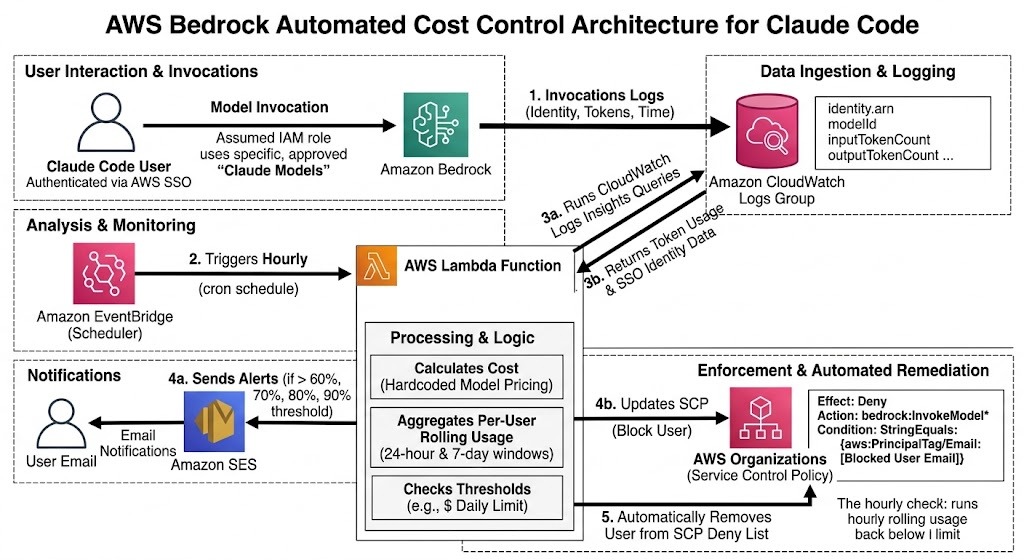
Our cost-control mechanism relies on a combination of Amazon CloudWatch, AWS Lambda, Amazon SES, and AWS Organizations (specifically Service Control Policies). By isolating Claude Code usage to specific AWS accounts and roles, we can granulate our tracking down to the individual user level using AWS IAM Identity Center (SSO) (This can be also extended based on email addresses to all the accounts if you are using AWS Identity Center)
Step 1: Granular Logging and AWS SSO Identity Mapping
The foundation of this system is visibility. We utilize specific IAM roles assigned exclusively to Claude Code users.
- Model Invocation Logging: Bedrock is configured to send all invocation logs to CloudWatch Log Groups.
- Identity Mapping via AWS SSO: Whenever a user invokes a Claude model via Claude Code, the CloudWatch logs capture the authenticated AWS SSO identity of the user, the timestamp, and the exact token consumption (Input, Output, ReadWrite, and ReadCache tokens).
Step 2: Hourly Automated Cost Calculation Across All Models
Because usage is restricted to a specific catalog of approved models, costs can be predicted and calculated programmatically without relying on live pricing API calls.
- Hourly Triggers: An AWS Lambda function is automatically triggered every hour via Amazon EventBridge to scan the environment.
- Multi-Model Log Queries: Operating with a dedicated CloudWatch execution role, the Lambda executes a suite of hardcoded CloudWatch Logs Insights queries—each tailored specifically to the log formats and token metrics of every allowed model in the organization.
- Aggregated Cost Tracking: The function processes the results across all queries simultaneously. It pulls the raw token usage (input, output, read/write, and cache hits) for each unique user identity across all models, calculating the absolute total cost accrued per user (Based on the actual bedrock pricing for each model)
Step 3: Rolling Thresholds and Dynamic SCP Enforcement
Standard monthly billing alerts are often too slow to prevent sudden spikes. Our architecture uses rolling windows (24-hour and 7-day) to enforce limits in near real-time.
- The Enforcement Mechanism: If the hourly Lambda execution determines that a specific user’s total cost has exceeded their allocated daily or weekly budget, it dynamically updates an AWS Organizations Service Control Policy (SCP).
- The Deny Action: The SCP applies an explicit
Denyaction for Bedrock invocation, targeting the specific user’s AWS SSO email ID. Once the SCP is updated, that user is immediately blocked from generating further Bedrock costs. - Auto-Remediation: Because the tracking uses a rolling window, once the oldest usage hours drop off and the user’s total spend falls back below the threshold, the next hourly Lambda execution automatically removes their email from the SCP Deny list, unblocking them seamlessly.
Step 4: Proactive Alerting via Amazon SES
Blocking a user without warning creates friction. To ensure a smooth developer experience, the Lambda function integrates with Amazon Simple Email Service (SES) to send proactive warnings.
- Users receive automated email notifications when they hit 60%, 70%, 80%, and 90% of their rolling limits.
- A final notification is dispatched when they hit 100%, informing them that their Bedrock access has been temporarily revoked until their rolling window clears.
Technical Deep Dive: Extracting User Identity and Token Usage
To make this architecture work, the hourly Lambda function needs to parse the raw CloudWatch Logs generated by Amazon Bedrock.
When users authenticate via AWS IAM Identity Center (SSO), their session name (usually their email address) is appended to the assumed IAM Role ARN. We use a CloudWatch Logs Insights query to dynamically parse this email out of the identity.arn field and aggregate the token usage.
Here is an example of the core CloudWatch query our Lambda executes to extract the SSO identity and calculate token usage:
fields @timestamp, identity.arn, modelId, input.inputTokenCount, output.outputTokenCount
# Parse the AWS SSO email ID from the assumed-role ARN
| parse identity.arn "*/*/*" as arn_prefix, role_name, sso_email_id

# Filter exclusively for the Claude 4.7 and 4.8 Opus models
| filter modelId in ["anthropic.claude-opus-4-7", "anthropic.claude-opus-4-8"]

# Aggregate token counts grouped by the user's email and the specific model
| stats
    sum(input.inputTokenCount) as totalInputTokens,
    sum(output.outputTokenCount) as totalOutputTokens,
    sum(input.cacheReadInputTokenCount) as totalCacheReadTokens,
    sum(input.cacheWriteInputTokenCount) as totalCacheWriteTokens,
    count(*) as totalInvocations
  by sso_email_id, modelId

# Filter out any non-SSO automated invocations
| filter ispresent(sso_email_id)

# Calculate the precise cost in USD based on Bedrock pricing
| display sso_email_id, modelId, totalInvocations, totalInputTokens, totalOutputTokens,
    (totalInputTokens / 1000000 * 5.0) as inputCost,
    (totalOutputTokens / 1000000 * 25.0) as outputCost,
    (totalCacheReadTokens / 1000000 * 0.5) as cacheReadCost,
    (totalCacheWriteTokens / 1000000 * 6.25) as cacheWriteCost,
    ((totalInputTokens / 1000000 * 5.0) + (totalOutputTokens / 1000000 * 25.0) + (totalCacheReadTokens / 1000000 * 0.5) + (totalCacheWriteTokens / 1000000 * 6.25)) as totalCostInDollars

# Sort by the highest spending users first
| sort totalCostInDollars descThe Lambda function takes these aggregated token counts, applies the respective pricing algorithm for each unique modelId, and checks the resulting total dollar amount against the user’s rolling thresholds to determine if the SES alerts or the SCP Deny action needs to be triggered.
Sample SCP
Here the Lambda function just updates the SCP and it doesn’t attach or detach the SCP to an account. All you need to do is create an SCP manually that blocks bedrock for users with email addresses and attach it to the accounts then make Lambda do it’s work! This is the sample SCP that should be attached to an account and then the SCP ID generated should be passed to the Lambda function
{
  "Version": "2012-10-17",
  "Statement": [
    {
      "Sid": "DenyBedrockForOverBudgetSSOSession",
      "Effect": "Deny",
      "Action": [
        "bedrock:InvokeModel",
        "bedrock:InvokeModelWithResponseStream"
      ],
      "Resource": "*",
      "Condition": {
        "StringLike": {
          "aws:userid": "*:[email protected]"
        }
      }
    }
  ]
}
Python Code for Lambda function
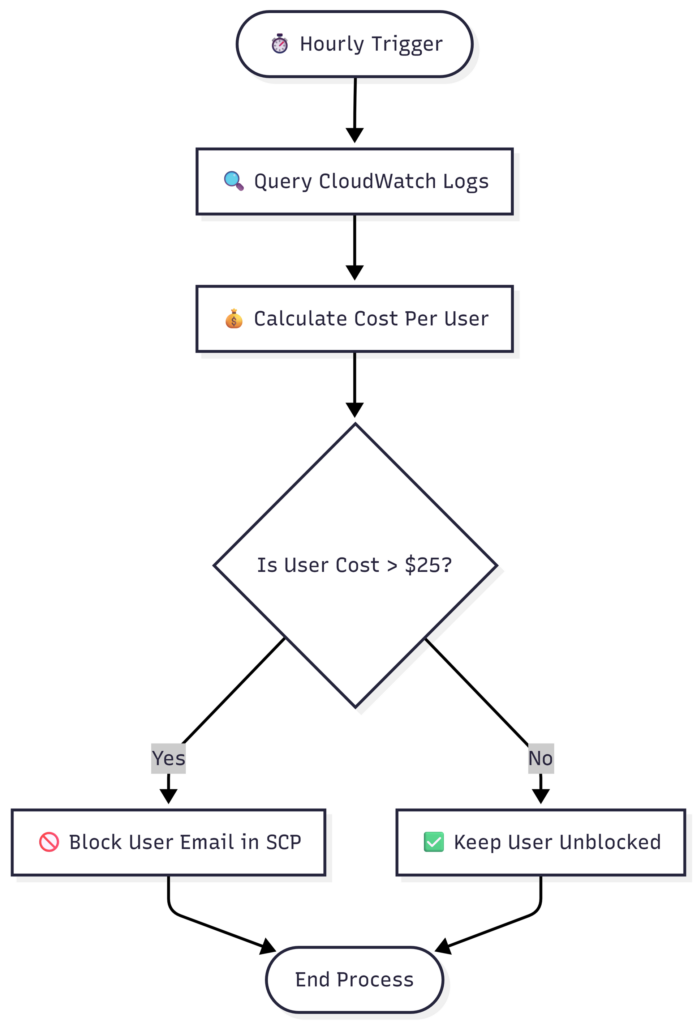
Lambda function runs every hour and checks whether a user has exceeded the hourly threshold and if the user has exceeded hourly threshold then they will be added to the SCP Deny list and finally SCP will be updated
import json
import time
import boto3
from botocore.exceptions import ClientError

# ==============================================================================
# CONFIGURATION
# ==============================================================================
CLOUDWATCH_ACCOUNT_ROLE_ARN = "arn:aws:sts::111222333444:role/CloudWatchLogsReadRole"
LOG_GROUP_NAME = "/aws/bedrock/modelinvocations"
SCP_POLICY_ID = "p-examplepolicyid123"
HOURLY_BUDGET_LIMIT = 25.00

# The target models to monitor
TARGET_MODELS = ["anthropic.claude-opus-4-7", "anthropic.claude-opus-4-8"]

# CloudWatch Logs Insights Query Template
INSIGHTS_QUERY_TEMPLATE = """
fields @timestamp, identity.arn, modelId, input.inputTokenCount, output.outputTokenCount
| parse identity.arn "*/*/*" as arn_prefix, role_name, sso_email_id
| filter modelId in {model_list}
| stats
    sum(input.inputTokenCount) as totalInputTokens,
    sum(output.outputTokenCount) as totalOutputTokens,
    sum(input.cacheReadInputTokenCount) as totalCacheReadTokens,
    sum(input.cacheWriteInputTokenCount) as totalCacheWriteTokens
  by sso_email_id, modelId
| filter ispresent(sso_email_id)
| fields sso_email_id, modelId,
    (totalInputTokens / 1000000 * 5.0) as inputCost,
    (totalOutputTokens / 1000000 * 25.0) as outputCost,
    (totalCacheReadTokens / 1000000 * 0.5) as cacheReadCost,
    (totalCacheWriteTokens / 1000000 * 6.25) as cacheWriteCost,
    ((totalInputTokens / 1000000 * 5.0) + (totalOutputTokens / 1000000 * 25.0) + (totalCacheReadTokens / 1000000 * 0.5) + (totalCacheWriteTokens / 1000000 * 6.25)) as totalCostInDollars
"""

# ==============================================================================
# STEP 1: ASSUME CROSS-ACCOUNT ROLE
# ==============================================================================
print(f"Assuming cross-account role: {CLOUDWATCH_ACCOUNT_ROLE_ARN}")
sts_client = boto3.client('sts')
assumed_role_object = sts_client.assume_role(
    RoleArn=CLOUDWATCH_ACCOUNT_ROLE_ARN,
    RoleSessionName="CloudWatchLogsSession"
)
credentials = assumed_role_object['Credentials']

# Construct target session using assumed credentials
logs_session = boto3.Session(
    aws_access_key_id=credentials['AccessKeyId'],
    aws_secret_access_key=credentials['SecretAccessKey'],
    aws_session_token=credentials['SessionToken']
)
logs_client = logs_session.client('logs')

# Define local client for AWS Organizations (assuming script runs from Management Account context)
org_client = boto3.client('organizations')

# ==============================================================================
# STEP 2: EXECUTE CLOUDWATCH LOGS INSIGHTS QUERY
# ==============================================================================
formatted_models = "[" + ", ".join(f'"{m}"' for m in TARGET_MODELS) + "]"
query_string = INSIGHTS_QUERY_TEMPLATE.format(model_list=formatted_models)

end_time = int(time.time())
start_time = end_time - 3600  # 1-hour lookback window

print("Starting CloudWatch Logs Insights query for the last hour...")
start_query_response = logs_client.start_query(
    logGroupName=LOG_GROUP_NAME,
    startTime=start_time,
    endTime=end_time,
    queryString=query_string
)
query_id = start_query_response['queryId']

# Poll until the query completes
while True:
    response = logs_client.get_query_results(queryId=query_id)
    status = response['status']
    if status in ['Complete', 'Failed', 'Cancelled']:
        if status != 'Complete':
            raise RuntimeError(f"CloudWatch query failed with status: {status}")
        break
    time.sleep(2)

# ==============================================================================
# STEP 3: PROCESS RESULTS AND CALCULATE USER COSTS
# ==============================================================================
user_hourly_costs = {}
for row in response['results']:
    # Convert the field list array to a dictionary for key-based lookups
    row_dict = {field['field']: field['value'] for field in row}
    email = row_dict.get('sso_email_id')
    total_cost = float(row_dict.get('totalCostInDollars', 0.0))

    if email:
        user_hourly_costs[email] = user_hourly_costs.get(email, 0.0) + total_cost

# Evaluate budget limits
violators = set()
print("\n--- Hourly Usage Review ---")
for email, cost in user_hourly_costs.items():
    print(f"User: {email} | Aggregated Cost: ${cost:.4f}")
    if cost > HOURLY_BUDGET_LIMIT:
        print(f"⚠️ ALERT: User {email} has breached the hourly budget of ${HOURLY_BUDGET_LIMIT}!")
        violators.add(email)

# ==============================================================================
# STEP 4: UPDATE SERVICE CONTROL POLICY (SCP) WITH DENY LIST
# ==============================================================================
print("\nSynchronizing block enforcement policies...")
try:
    # Fetch current policy content from AWS Organizations
    policy_desc = org_client.describe_policy(PolicyId=SCP_POLICY_ID)
    policy_content = json.loads(policy_desc['Policy']['Content'])

    statement_found = False
    for statement in policy_content.get('Statement', []):
        if statement.get('Sid') == "DenyBedrockForOverBudgetSSOUser":
            # Ensure the condition paths exist safely
            if 'Condition' not in statement:
                statement['Condition'] = {}
            if 'StringEqualsIgnoreCase' not in statement['Condition']:
                statement['Condition']['StringEqualsIgnoreCase'] = {}

            # Inject blocked users or apply a placeholder if no one broke the budget
            if violators:
                statement['Condition']['StringEqualsIgnoreCase']['aws:PrincipalTag/Email'] = list(violators)
                statement['Effect'] = "Deny"
            else:
                # AWS SCPs throw validation errors on empty condition arrays. Use a generic dummy value.
                statement['Condition']['StringEqualsIgnoreCase']['aws:PrincipalTag/Email'] = ["[email protected]"]

            statement_found = True
            break

    if statement_found:
        # Push modified JSON string back to AWS Organizations
        org_client.update_policy(
            PolicyId=SCP_POLICY_ID,
            Content=json.dumps(policy_content, indent=2)
        )
        print(f"Successfully updated SCP {SCP_POLICY_ID}. Current blocked list: {list(violators) if violators else 'None'}")
    else:
        print(f"Warning: Sid 'DenyBedrockForOverBudgetSSOUser' was not found in the target policy. No modifications were pushed.")

except ClientError as e:
    print(f"Error executing AWS Organizations policy mutation: {e}")
Conclusion
By combining CloudWatch Insights, hourly Lambda automation, AWS SSO, and dynamic SCPs, organizations can deploy powerful LLM tools like Claude Code without compromising their cloud budgets. This architecture ensures that developers have the tools they need, while FinOps teams maintain absolute control over the bottom line.