This guide covers the most efficient ways to update your Virtualmin packages to ensure your server remains protected against the latest vulnerabilities.. As of 2026, with the release of Virtualmin 8, the process has become even more streamlined, offering better support for modern distributions like Ubuntu 26.04 and Debian 13.
Contents
- How to Update Virtualmin Packages: The Quick Guide
- Why You Must Prioritize Virtualmin 8 Updates
- Best Practices Before You Click “Update”
- Troubleshooting Common Virtualmin Update Errors
- Conclusion: Keep Your Server Optimized
How to Update Virtualmin Packages: The Quick Guide
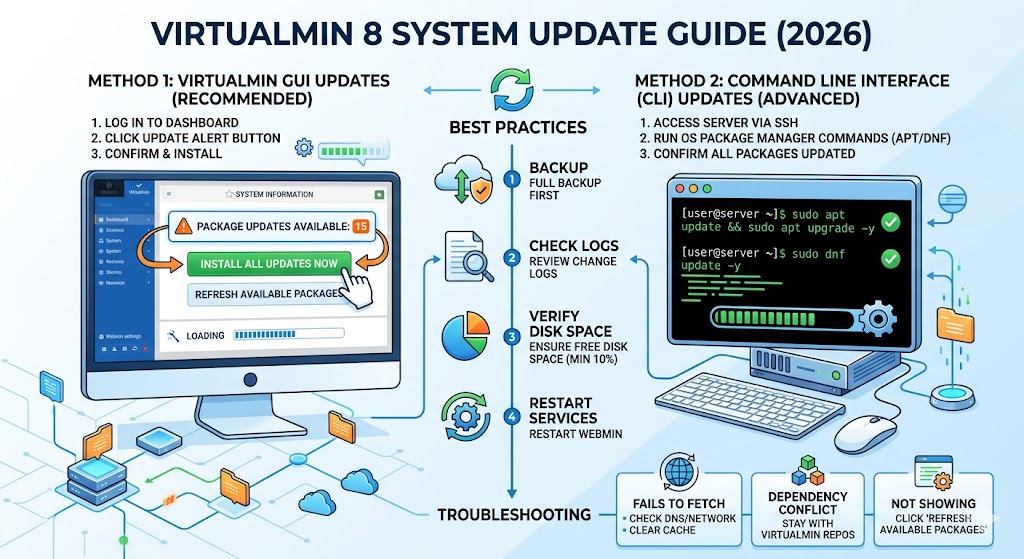
For most users, the fastest and safest way to handle updates is through the Virtualmin dashboard itself.
Update via the Virtualmin GUI (Recommended)
- Log in to your Virtualmin control panel.
- On the System Information dashboard, look for the “Package updates” status.
- Click the Install All Updates Now button if notifications are present.
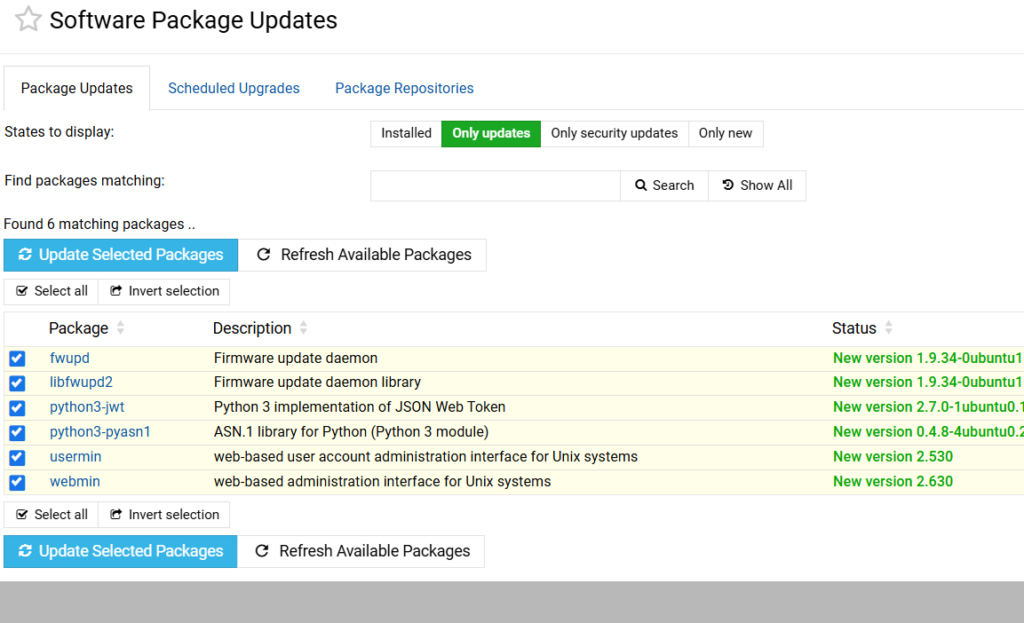
- Alternatively, go to Webmin > System > Virtualmin Package Updates.
- Set “Display Mode” to Updates and new and “Packages to show” to All packages.
- Click Update Selected Packages to begin the process.
Update via Command Line (Advanced)
If you prefer the terminal or are managing multiple servers via SSH, use your operating system’s native package manager. Virtualmin uses standard repositories, so this is perfectly safe.
For Ubuntu / Debian:
Bash
sudo apt update && sudo apt upgrade -y
For CentOS / RHEL / AlmaLinux:
Bash
sudo dnf update -y
Why You Must Prioritize Virtualmin 8 Updates
Updating isn’t just about getting a new version number. In 2026, the stakes for server security are higher than ever.
- Zero-Day Protection: Virtualmin 8 introduces rapid patching for the latest web server exploits.
- PHP Management: New updates include enhanced features for managing multiple PHP versions and configurations natively.
- OS Compatibility: Essential for those moving to the latest Linux kernels and distributions like Ubuntu 26.04.
- New Tools: Access to the WP Workbench (for Pro users) and the new WebSockets-based terminal.
Best Practices Before You Click “Update”
Even though Virtualmin updates are generally stable, professional server management requires a “safety first” approach.
1. Create a Full Backup
Before any major package update, navigate to Virtualmin > Backup and Restore > Backup Virtual Servers. Ensure you have a snapshot of your configurations and databases.
2. Check the Change Log
Review what’s changing. Sometimes a major update to a service like MariaDB or Nginx may require manual configuration tweaks after the update.
3. Verify System Resources
Ensure you have at least 10% free disk space. A full disk can cause an update to hang mid-process, leading to corrupted package headers.
Troubleshooting Common Virtualmin Update Errors
If your update stalls or returns an error, don’t panic. Most issues are related to repository metadata.
“Failed to fetch” or Connection Errors
This usually means the Virtualmin software repositories are temporarily unreachable or your DNS is misconfigured. Try clearing your package manager cache:
- Ubuntu/Debian:
sudo apt clean && sudo apt update - RHEL/AlmaLinux:
sudo dnf clean all
Dependency Conflicts
If the GUI reports a conflict, it’s often because a third-party repository is offering a different version of a core package (like Apache). Stick to the official Virtualmin and OS repositories to avoid these “version wars.”
GUI Not Showing Updates
If you know an update is available but it isn’t appearing in the panel, go to the Virtualmin Package Updates module and click the Refresh Available Packages button. This forces the panel to query the repositories again.
Conclusion: Keep Your Server Optimized
Updating Virtualmin is the single most effective way to maintain a healthy hosting environment. Whether you use the one-click GUI method or the precision of the CLI, staying current ensures your websites run faster and your data remains secure.
Is your server running Virtualmin 8 yet? Check your dashboard now to see if you’re missing out on the latest performance enhancements!